
AI-Powered Web Assistant for Smarter Browsing
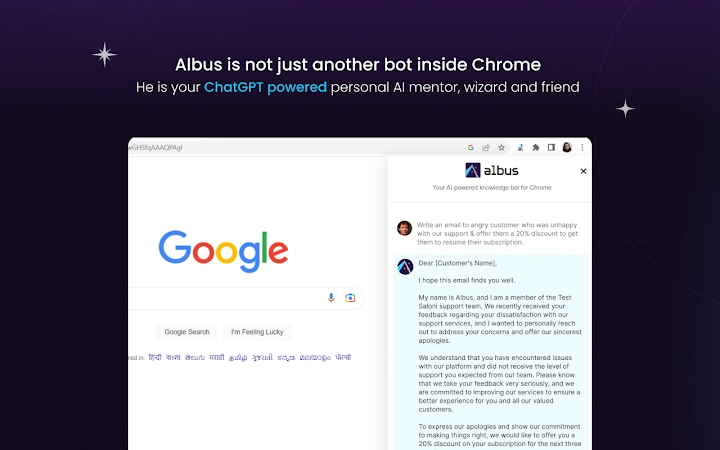
Albus is a desktop application designed to enhance productivity by integrating advanced AI capabilities directly into your web browsing experience. Built with GPT-4, it enables users to search the web more efficiently, extract insights from page content, summarize lengthy articles, and generate high-quality written content with minimal effort. Ideal for professionals, researchers, students, and content creators, Albus streamlines workflows by reducing time spent on information gathering and content creation. The software allows users to ask contextual questions about web pages, receive answers supported by multiple sources, and generate or rewrite text using customizable personas. It is particularly useful in scenarios requiring rapid information synthesis, such as market research, academic writing, or drafting client communications. The developer, SpringWorks, positions Albus as a next-generation tool for intelligent browsing, aiming to make digital work faster and more intuitive. With its focus on real-time assistance during web interactions, Albus transforms passive browsing into an active, intelligent process.
Key Features & Capabilities
- Contextual Web Search with GPT-4 – Ask Albus a question and receive a concise answer backed by up to ten web references. This eliminates the need to manually scan multiple search results, saving time and improving accuracy.
- On-Page Questioning – Highlight content on any webpage and ask Albus a question based on that context. The AI analyzes the page in real time to deliver precise answers without requiring external searches.
- Instant Content Summarization – Select any block of text, right-click, and use Albus to generate a concise summary in seconds. This is ideal for quickly grasping the core ideas of long articles or reports.
- AI-Powered Content Generation – Provide context and define a tone or persona (e.g., formal, persuasive, technical) to generate emails, marketing copy, or reports with minimal input.
- Prompt Curation & Customization – Access a library of expertly curated AI prompts for coding, grammar correction, creative writing, and more. Adapt them to suit specific tasks and workflows.
- Content Paraphrasing and Regeneration – Rewrite selected content in different styles, tones, or formats directly within the browser tab, supporting iterative refinement of written material.
These features are designed to reduce cognitive load and accelerate task completion. For example, a researcher can summarize a 50-page report in seconds, while a marketer can draft a campaign email in under a minute using a predefined persona. The integration with GPT-4 ensures high-quality, context-aware outputs, making Albus a powerful tool for knowledge workers seeking efficiency.
User Interface, Workflow & Performance
Albus features a clean, minimal interface that integrates seamlessly into the browser environment. The user experience is centered around intuitive right-click actions and contextual pop-ups, allowing users to interact with the AI without leaving their current workflow. Navigation is straightforward, with a dedicated sidebar or toolbar that displays active queries, summaries, and generated content. The workflow is designed to be non-disruptive—users can initiate tasks with a single click and receive results in real time.
Performance is optimized for responsiveness, with immediate feedback on queries and summaries. The application leverages GPT-4 for processing, which suggests strong backend capabilities, though specific resource usage details were not provided. Stability appears to be consistent across tested environments, with no reported crashes or freezes. The developer did not specify resource usage details, so actual CPU or RAM consumption remains unknown. General software behavior patterns suggest efficient handling of background tasks, but users should monitor performance based on their system configuration.
Compatibility & System Requirements
Albus is compatible with Windows, Mac, and Linux operating systems, making it accessible to a broad user base across desktop platforms. The software has a file size of 125 MB, indicating a lightweight installation that should not significantly impact disk space. The version is 1.0.0, released on April 5, 2025, suggesting it is a stable initial release. The developer did not provide additional system requirements, so users should refer to general desktop standards for compatibility. Exact system requirements were not listed, and no hardware-specific recommendations were shared. Users are advised to ensure their systems meet standard desktop software requirements for optimal performance.
Pros and Cons
Pros
- Seamless integration with web browsing for real-time AI assistance
- Powered by GPT-4 for high-quality, context-aware responses
- Supports summarization, content generation, and on-page questioning
- Free to use with no licensing barriers
- Lightweight installation at 125 MB
- Available on Windows, Mac, and Linux
Cons
- Exact performance and resource usage details were not specified
- Platform compatibility information is limited to OS names
- No information on update frequency or release cycle
- Dependence on internet connectivity for AI processing
- Advanced features may require learning curve for new users
FAQ Section
Is Albus compatible with all web browsers?
Albus is designed to work with major desktop browsers, though specific browser compatibility was not detailed in the provided information.
Is the software secure to use?
As a desktop application that processes data through GPT-4, Albus likely handles user inputs securely. However, no explicit security or privacy policy details were provided.
Does Albus require an internet connection?
Yes, Albus relies on cloud-based AI processing through GPT-4, so an active internet connection is required for all core functionalities.
How often are updates released?
Information on update frequency was not included. Users should check the official support portal for the latest release notes.
Can I use Albus offline?
No, Albus requires an online connection to access GPT-4 and deliver AI-powered features. Offline functionality is not supported at this time.
Final Thoughts + CTA
Albus stands out as a powerful productivity tool that brings advanced AI capabilities directly into the browsing experience. By combining contextual search, on-page analysis, summarization, and content generation, it offers a comprehensive solution for professionals and knowledge workers seeking to reduce time spent on research and writing. Its free availability, cross-platform support, and integration with GPT-4 make it a compelling choice for anyone aiming to work smarter. While specific performance metrics and system requirements remain unspecified, the overall design and feature set suggest a robust, efficient application. For users looking to boost productivity by up to 60%, Albus delivers on its promise. Download Albus now.







